Monday, March 17, 2025

Outlook Email Configuration Service – Get Seamless Email Setup!

 Outlook Email Configuration Service – Get Seamless Email Setup!

Outlook Email Configuration Service – Get Seamless Email Setup!

✅ Setting up business emails (IMAP, POP3, SMTP)
✅ Troubleshooting email sending/receiving issues
✅ Synchronization with multiple devices
✅ Secure email setup with encryption
✅ Spam filter and backup configuration
Let us handle your email setup so you can focus on what matters most—your business!
Why Choose Prime Programmer?
🔹 Expert Support & Quick Setup
🔹 Hassle-Free Configuration
🔹 Affordable Pricing
🔹 24/7 Assistance
💻 Get Your Outlook Email Configured Today!
📞 Contact Us: +91-8795202855
📧 Email: info@primeprogrammer.com
🚀 Let’s streamline your business communication now!
📩 Contact us today for quick and hassle-free email configuration.

https://g.page/r/CRL8Vm9-C7rhEBM/review


Thursday, May 23, 2024

Front-End Custom Development


Front-End Custom Development


Front-End Custom Development

Our front-end functional components are tailor-made, crafted from the ground up to provide not only exceptional ease of maintenance and scalability, but also unparalleled reliability and stability. Our team of seasoned web developers is committed to creating bespoke online solutions. Whether it involves enhancing an existing application or designing a complex enterprise system, our developers are prepared to tackle any challenge. By prioritizing the unique requirements and objectives of our clients, Evolve delivers custom web solutions that yield tangible results.

Monday, May 20, 2024

Website Design and Development Service


Website Design and Development Service


Prime Programmer offers a range of IT solutions tailored to meet the needs of your business:

1. Website Design and Development
2. Website Technology Upgrades
3. Custom Web Application Software Development
4. Payment Gateway Integration for Existing Websites

5. Search Engine Optimization Services
6. SMS Gateway Integration

Our services are designed to enhance the online presence and functionality of your business at competitive rates.

Sunday, May 28, 2023

colourful pyramid using PHP


colourful pyramid using PHP


<!DOCTYPE html>
<html lang="en">
<head>
  <title>Colorfull Pyramid</title>
  <meta charset="utf-8">
  <meta name="viewport" content="width=device-width,
initial-scale=1">
  <link href="https://cdn.jsdelivr.net/npm/bootstrap@5.2.3/
dist/css/bootstrap.min.css" rel="stylesheet">
  <script src="https://cdn.jsdelivr.net/npm/bootstrap@5.2.3/
dist/js/bootstrap.bundle.min.js"></script>
</head>
<body>

<div class="container">
   <div class="row">
    <div class="col-md-12 h4">
<?php

for($i=0; $i<=9; $i++){
   
     for($j=$i; $j<9; $j++){
       
        echo "&nbsp;";        
     }
     
     for($k=1; $k<$i; $k++) {
        echo "<span class='jump-response'> * </span>";
     }
           
   
    echo "<br/>";
}
?>
    </div>
  </div>

</div>
<script src="https://ajax.googleapis.com/ajax/libs/jquery/
3.6.4/jquery.min.js"></script>

<script>
    $(function() {
    $(".jump-response").each(function() {
        var hue = 'rgb(' + (Math.floor((256-100)*
Math.random()) + 150) + ',' + (Math.floor((256-100)*
Math.random()) + 50) + ',' + (Math.floor((256-100)*
Math.random()) + 50) + ')';
         $(this).css("color", hue);
    });
});
</script>
</body>
</html>


Saturday, May 27, 2023

How do you use Laravel 10 to redirect all requests to the public/ folder?


How do you use Laravel 10 to redirect all requests to the public/ folder?

How do you use Laravel 10 to redirect all requests to the public/ folder?

 Using .htaccess with mod_rewrite


<IfModule mod_rewrite.c>

    RewriteEngine on

    RewriteRule ^(.*)$ public/$1 [L]

</IfModule>

Get Month's Name using PHP Logic


Month's Name using PHP Logic

Get Month's Name using PHP Logic

<select class="form-control border border-success">
    <option value="">--select month...</option>
    <?php
    $curmonth = date("F");
    for($i = 1 ; $i <= 12; $i++)
    {
    $allmonth = date("F",mktime(0,0,0,$i,1,date("Y")))
    ?>
        <option value="<?php
        echo $i; ?>" <?php
        if($curmonth==$allmonth) echo ' selected';
        ?>>
        <?php
        echo date("F",mktime(0,0,0,$i,1,date("Y")));
        //Close tag inside loop
        ?>
        </option>
        <?php } ?>
</select>

Friday, May 6, 2022

Tuesday, May 3, 2022

Update Google Chrome Browser(Version 101.0.4951.54 (Official Build)) Immediately


Update Google Chrome Browser Version 101.0.4951.54 (Official Build) Immediately

Update Google Chrome Browser(Version 101.0.4951.54 (Official Build)) Immediately 


To upgrade Chrome to the most recent version, go to "Chrome 101.0.4951.41" in your browser.


1. In the upper right corner of your window, click the three dots.

2. From the left rail's options, select "About Chrome."

3.  Click “Settings,” which opens a new tab.

4. Chrome will begin to look for the most recent version and install it. When it's finished, click "Relaunch" to complete the update. (As seen in the photo on the right.)

5. Chrome will close for a few seconds before reopening with all of your open tabs. "Chrome is up to date," you'll see confirmation.


Conclusion


Now we can see above how to update chrome browser.

Updated chrome browser preview


Also Provide

GST billing software

Stock Management software

Mobile application development

Payment Gateway Integration(core PHP, Laravel and Python)


Saturday, February 26, 2022

Friday, February 25, 2022

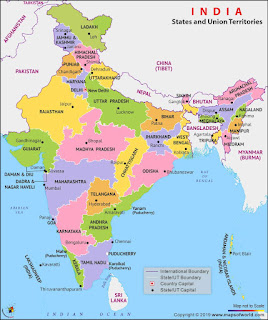
India State List in Select HTML Tag

 India State List in Select HTML Tag

India Map


<code> <!DOCTYPE html>
<html lang="en">
<head>
<title>Bootstrap Example</title>
<meta charset="utf-8">
<meta name="viewport" content="width=device-width, initial-scale=1">
<link rel="stylesheet" href="https://maxcdn.bootstrapcdn.com/bootstrap/3.4.1/css/bootstrap.min.css">
<script src="https://ajax.googleapis.com/ajax/libs/jquery/3.5.1/jquery.min.js"></script>
<script src="https://maxcdn.bootstrapcdn.com/bootstrap/3.4.1/js/bootstrap.min.js"></script>
</head>
<body>

<div class="container">
<h2>Well</h2>
<div class="well">
<div class="form-group mb-5">
<label class="control-label col-sm-2" for="state">Select State:</label>
<div class="col-sm-10 mb-5">

<select name="state" class="form-control" id="CollegeState">
<option value="">All India State List</option>
<option value="Andhra Pradesh">Andhra Pradesh</option>
<option value="Chhattisgarh">Chhattisgarh</option>
<option value="Delhi">Delhi</option>
<option value="Goa">Goa</option>
<option value="Gujarat">Gujarat</option>
<option value="Haryana">Haryana</option>
<option value="Himachal Pradesh">Himachal Pradesh</option>
<option value="Jharkhand">Jharkhand</option>
<option value="Karnataka">Karnataka</option>
<option value="Madhya Pradesh">Madhya Pradesh</option>
<option value="Maharashtra">Maharashtra</option>
<option value="Manipur">Manipur</option>
<option value="Orissa">Orissa</option>
<option value="Puducherry">Puducherry / Pondich</option>
<option value="Pune">Pune</option>
<option value="Rajasthan">Rajasthan</option>
<option value="Sikkim">Sikkim</option>
<option value="Tamil Nadu">Tamil Nadu</option>
<option value="Uttar Pradesh">Uttar Pradesh</option>
<option value="Uttarakhand">Uttarakhand / Uttara</option>
<option value="West Bengal">West Bengal</option>
</select>

</div>
</div>

</form>
<br>
<br>
</div>
</div>

</body>
</html>
</code>

Sunday, October 3, 2021

Disable XDG Popup In chrome URL like what's app api link


                                              How To Disable Any URL in XDG Popup


sudo mkdir -p /etc/opt/chrome/policies/managed/ && echo '{ "URLWhitelist": ["whatsapp://*"] }' |sudo tee /etc/opt/chrome/policies/managed/whitelist.json


Wednesday, May 19, 2021

How to Update Composer 2.0 in Ubuntu 20.04 ?

 How to Update Composer in Ubuntu 20.04 ?


Important Steps to update Composer 2.0:


1. Open Ubnutu Terminal by using CTRL+ ALT+ T

2. $ cd ~ 

3. $ curl -sS https://getcomposer.org/installer -o composer-setup.php

4. To install composer globally, use the following command which will download and install Composer as a system-wide command named composer, under /usr/local/bin:

 $ sudo php composer-setup.php --install-dir=/usr/local/bin --filename=composer

Check updated version of composer

How to Update Composer 2.0 in Ubuntu 20.04


Conclusion


Now we can see above how to update composer

Also Provide

GST billing software

Stock Management software

Mobile application development

Payment Gateway Integration(core PHP, Laravel and Python)


Saturday, January 9, 2021

Lead Management System(LMS) Software Online

 Lead Management System Software Online

Lead Management System(LMS) Software Online


Our Leads Management System(LMS) Features

1. Admin login

2. Telecaller registration

3. Update Excel Data

4. Assign data to all telecallers in a very short time

5. Daily report

6. Previous history record


Lead Auto
The biggest benefit of any lead management software online is the automatic alloted of the leads. This system allots and forwards the leads to the user login inbox from where the distribution and assignment takes place.

Lead Assignment
There are various departments in any industry. You need specialists to handle each job. The lead management system makes your job of assigning the leads to the right person an easy job.

Lead Prioritization
It is very important to rank your leads in order of their quality. The lead management system programs do this process based on the sales readiness of the leads. This can help you to focus on the right leads.

Lead Plan
Plan your leads activities is important in order to convert them into sales. This online software plans your follow up calls.

Lead Report and Tracking
In this system we provide accurate reports of each lead.

Save your valuable Time
This lead management system is not different in any way. You have the facility of programming the automation of the routine tasks thereby leaving you with more time to pursue the leads and convert them into an actual business.


Conclusion

Any lead management online system should be compatible with other software systems. This integration is very important for successful conversion of leads into business.
Now maintain your leads in a very easy process.

Also Provide

GST billing software

Stock Management software

Mobile application development

Payment Gateway Integration(core PHP, Laravel and Python)


Prime Programmer

    8795202855

Prime Programmer


Thursday, September 24, 2020

Steps To Integrate Easebuzz Payment Gateway Using Core PHP


Steps To Integrate Easebuzz Payment Gateway Using Core PHP

Steps to integrate Easebuzz payment gateway by using Core PHP

Pay with Easebuzz is a payment gateway aggregator who offers an electronic payment service for any merchant website irrespective of their backend technology. 

How To get Easebuzz Payment Gateway


1. Sign up on easebuzz and upload your required documents.
2. Request for test credentials and integrate payment gateway.
3. Change credentials to production and start collecting payments online.
4. You can also use your Easebuzz account to also receive payments by creating links, or Easepay. 

Integration proccess using Core PHP


1. After downloaded payment gateway kit copy and paste easebuzz-lib folder in your's project directory.

2. Create Two PHP files easebuzz.php and response.php 

3. Than include "include_once('easebuzz-lib/easebuzz_payment_gateway.php'); " in easebuzz.php file.

4. Next Set Environment $MERCHANT_KEY, $SALT and $ENV.
          $MERCHANT_KEY = "11PKP71CDZ3";
          $SALT = "DEF78E8IXY";         
          $ENV = "test";   // set enviroment name

5. create Easebuzz class object and pass $MERCHANT_KEY, $SALT and $ENV.
            $easebuzzObj = new Easebuzz($MERCHANT_KEY, $SALT, $ENV);


6. call Easebuzz class methods and function based on your's requirements.
       a). Initiate Payment API POST Format and call initiatePaymentAPI

    $postData = array ( 
        "txnid" => "T3SAT0B5OL", 
        "amount" => "100.0", 
        "firstname" => "jitendra", 
        "email" => "test@gmail.com", 
        "phone" => "1231231235", 
        "productinfo" => "Laptop", 
        "surl" => "http://localhost:3000/response.php", 
        "furl" => "http://localhost:3000/response.php", 
        "udf1" => "aaaa", 
        "udf2" => "aaaa", 
        "udf3" => "aaaa", 
        "udf4" => "aaaa", 
        "udf5" => "aaaa", 
        "address1" => "aaaa", 
        "address2" => "aaaa", 
        "city" => "aaaa", 
        "state" => "aaaa", 
        "country" => "aaaa", 
        "zipcode" => "123123" 
    );

    $easebuzzObj->initiatePaymentAPI($postData);    

  b). Transaction API POST Format and call transaction API

    $postData = array ( 
        "txnid" => "TZIF0SS24C",
        "amount" => "1.03",
        "email" => "test@gmail.com",
        "phone" => "1231231235"
    );

    $result = $easebuzzObj->transactionAPI($postData); 

7. Process is completed.

Conclusion

So we can see how to integrate easebuzz payment gateway.


Please let us know if you are facing any issue while payment.

Also Provide

GST billing software

Stock Management software

Mobile application development

Payment Gateway Integration(core PHP, Laravel and Python)


Prime Programmer

    8795202855

Prime Programmer


Monday, September 21, 2020

Steps To Integrate ICICI Bankonnect Payment Gateway In Core PHP

Steps To Integrate ICICI Bankonnect Payment Gateway In Core PHP


Steps To Integrate ICICI Bankonnect Payment Gateway In Core PHP

Bank open is an new system to collect payment via PHP Technology. Following are the steps:


PG Sandbox APIs for Bankonnect PG.


Step 1:  After Signup, the merchant can go on Bankonnect.co and generate the Sandbox Keys from the tab - Integration - Payment Gateways

Step 2: Go to docs.bankopen.com and  For generating the Request Signature, please refer to the documentation, https://docs.bankopen.com/docs/authentication,  "Authentication" and follow the steps for "Authorization header" which will be required for creating Payment token and once completed  go to "Payment Gateway" click on "Layer" and then click on “Layer Checkout” for the integration.  The Authorization header would be 'bearer ACCESS_KEY:REQUEST SIGNATURE'.  


Step 4: Create HTML Form

Make Donation Online

1. Name

2. Email

3. Mobile number

4. Amount


Step 5: Payment accept Page

 _do_post(

      $payment_token['create']['route'],

      [

        'customer_name' => $name,

        'amount' => $amount,

        'currency'  => 'INR',

        'mtx' => date('ymdhis'),//merchant-reference-number

        'email_id' => $email,

        'contact_number' => $mobile

      ]

    );

?>


"; print_r($http->get_last_http_error()); echo "

";

    print_r($exception->getMessage());

  }

}

?>


Step 6: Response Received


_do_get(

        sprintf($payment_token['status']['route'], $payment_token_id)

    );


    $data['data'] = json_decode(json_encode($payment_token_data), true);

    $data['time'] = date('d-m-Y: H:i:s');


    $inp = file_get_contents('response.json');


    $tempArray = json_decode($inp);

    array_push($tempArray, $data);

    $jsonData = json_encode($tempArray);

    file_put_contents('response.json', $jsonData);

} catch (Exception $exception) {


    echo "

";

    print_r($http->get_last_http_error());

    echo "

";

    print_r($exception->getMessage());

} ?>

Thanks for payment


Payment Status: Success                   


Transaction Number:Z_UDFjsKL  


conclusion:

So we have seen simple example how to integrate payment gateway using PHP technology. If you are facing any issue please contact

Other Payment Gatway Integration also Available

1. Paytm Payment Gateway Integration in PHP

2. Razorpay Payment Gateway Integration in PHP

3. Bankonnect Payment Gateway Integration in Android App or Mobile App

4. Instamojo Payment Gateway Integration in PHP

5. Easebuzz Payment Gateway Integration in PHP

6. ENACH API Integration in PHP


For Integration kindly mail: mahendra@primeprogrammer.com

Also Provide

GST billing software

Stock Management software

Mobile application development

Payment Gateway Integration(core PHP, Laravel and Python)


Prime Programmer

    8795202855

Prime Programmer


Outlook Email Configuration Service – Get Seamless Email Setup!

  Outlook Email Configuration Service – Get Seamless Email Setup! Setting up business emails (IMAP, POP3, SMTP) Troubleshooting email send...

Clock